Skip to content
AuraStack

Channel partner CRM for real estate builders Your channel partners, finally on one desk.

AuraStack gives your sourcing team one place to onboard and grade channel partners, see the leads and site visits each one brings, and pay brokerage on confirmed bookings. Every partner gets a login that shows their own deals — with your other buyers masked.

WhatsApp us+91 99679 1784630 days · your own tenant · no card

We use these details only to set up your trial and call you about it.

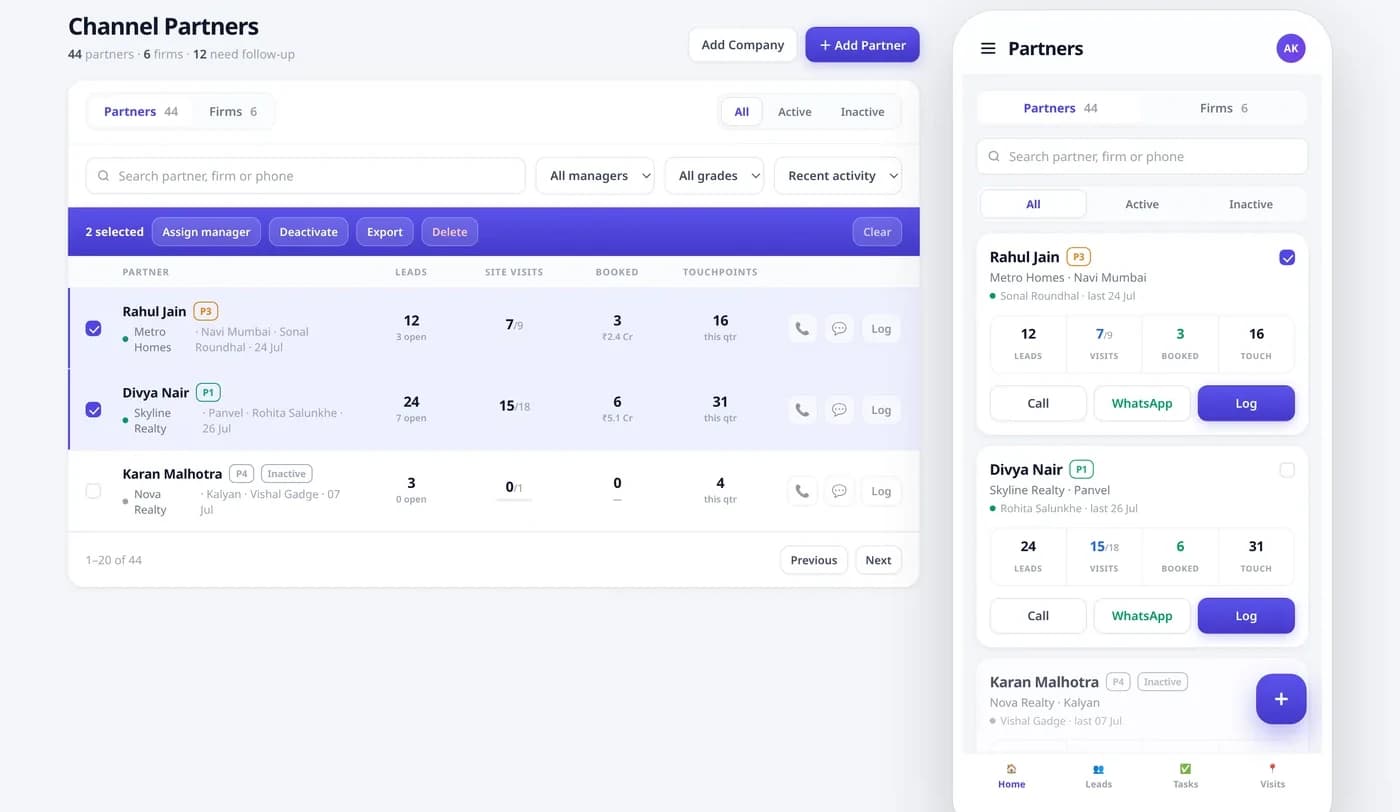
AuraStack channel partner desk on desktop and phone: partners and firms with grades, assigned managers, leads, site visits, bookings and touchpoints, with call, WhatsApp and log actions.
The CP desk from the running product. Names and figures are from a demo tenant.

01/06Where it leaks

Partners bring the buyers. Spreadsheets lose the trail.

For many builders, channel partners bring a big share of the buyers — and that is exactly where the record goes missing.

  • CP leads

    Without a CP desk

    Arrive on WhatsApp and phone calls, and live in someone’s inbox.

    With AuraStack

    Logged against the partner who brought them, in the same lead list as every other source.

  • Partner activity

    Without a CP desk

    Nobody knows which partners are active until the quarter is over.

    With AuraStack

    Active and inactive partners, grades, the owning manager and the last touchpoint on one list.

  • Walk-ins & visits

    Without a CP desk

    Written in a register at the sales office.

    With AuraStack

    CP walk-ins and site visits counted per partner, this quarter.

  • Brokerage

    Without a CP desk

    Worked out in Excel when the partner calls to ask.

    With AuraStack

    Computed on confirmed bookings, with payouts pending 30 days or more flagged.

  • Partner access

    Without a CP desk

    Sharing a sheet means sharing your whole buyer list.

    With AuraStack

    A login that sees only their own referrals, with buyer details masked.

02/06The CP desk

Every partner, on one list.

What your sourcing team works from every day — on the desktop and on the phone.

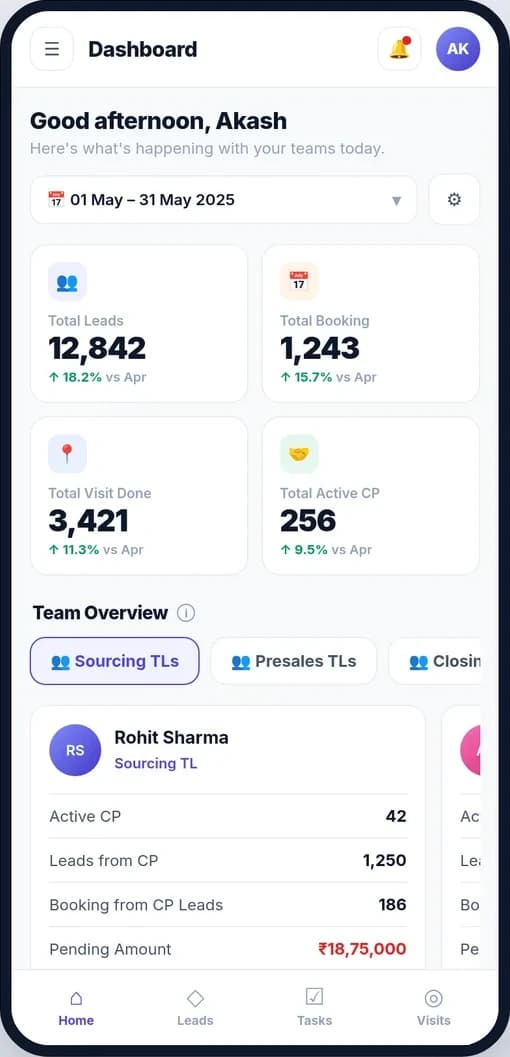
AuraStack on a phone: the team overview with a sourcing team lead’s active CPs, leads from CPs, bookings from CP leads and pending brokerage.
Active CPs, leads and bookings from CPs, and pending brokerage — per sourcing TL.
  • Partners and firms together

    Each partner sits under their firm, with a grade from P1 to P4 and the sourcing manager who owns the relationship.

  • Numbers per partner

    Leads, site visits, bookings and touchpoints for the quarter — so you can see who is really selling.

  • One tap to act

    Call, WhatsApp or log a touchpoint from the desk or from the phone.

  • Bulk actions

    Assign a manager, deactivate or export a group of partners in one go.

  • A sourcing scoreboard

    Active CPs, leads and bookings from CPs, pending brokerage, CP meetings, walk-ins, and new and inactive CPs — on the Sourcing TL dashboard.

03/06Brokerage

Brokerage that computes itself.

Set the rule once. AuraStack works out what each partner has earned from confirmed bookings, and shows what is still owed.

  1. 01

    Booking confirmed

    The booking stays tied to the partner who brought the buyer.

  2. 02

    First payment verified

    Accounts verify the payment maker-checker before brokerage is computed.

  3. 03

    Brokerage computed

    Slab, flat or percent — whichever rule you set — worked out automatically.

  4. 04

    Paid in batches

    Payouts go out in batches, and anything pending 30 days or more is flagged.

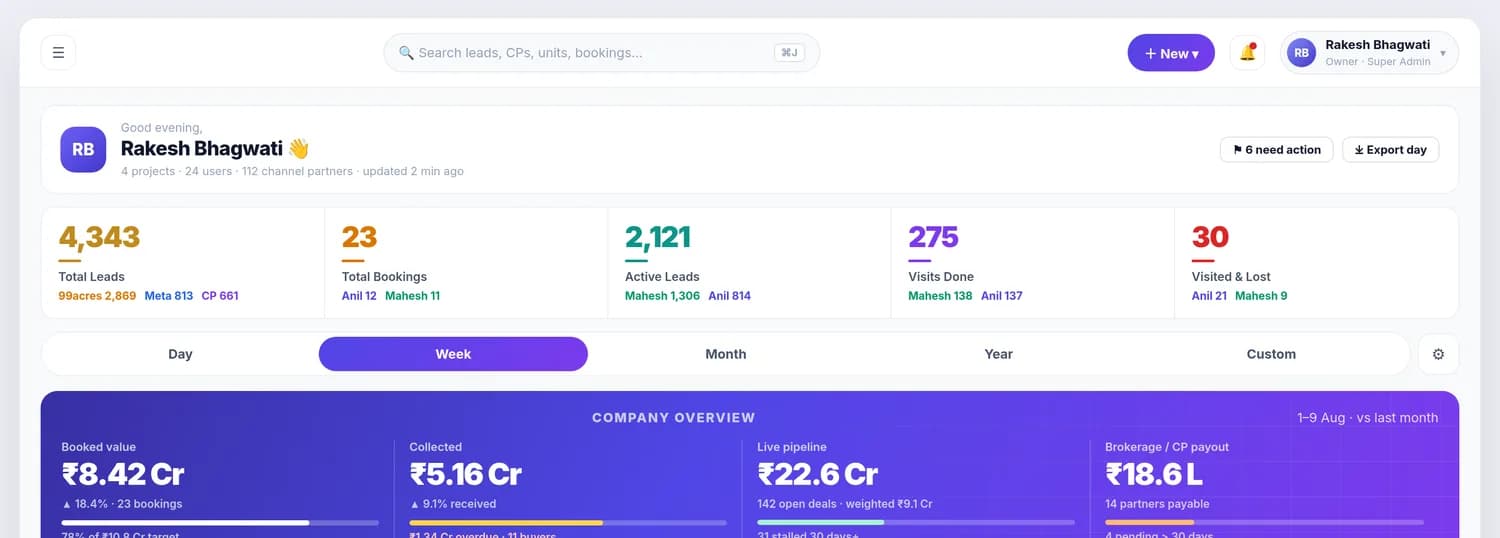
AuraStack owner dashboard money band: booked value, collected, live pipeline and brokerage payable to channel partners, with partners payable and payouts pending over 30 days.
Brokerage due sits in the owner’s money band, next to booked value, collections and the live pipeline.

04/06Partner logins

Give partners a login. Keep your buyer list.

Each partner gets the Broker Partner role: the leads, visits and bookings they brought in, and what they earned on them. Nothing else.

  • Referral data scope

    A partner sees the leads, visits and bookings they brought in, and what they earned on them — nothing else.

  • Masked at the field

    Phone, email, Aadhaar, PAN, deal value, commission and address are set to full, partial or hidden per role.

  • Every view on record

    Who opened which buyer, and when, is in the audit trail — masked fields included.

  • One login per builder

    Each builder is an isolated tenant, so a partner selling for three builders holds three separate logins.

The same lead, three roles

  • Admin

    Phone
    +91 98765 43210
    Email
    rahul@bhagwati.in
    Deal value
    ₹1.24 Cr
  • Broker Partner

    Phone
    +91 ******3210
    Email
    r*****@b*******.in
    Deal value
    hidden
  • Viewer

    Phone
    hidden
    Email
    hidden
    Deal value
    hidden

Masked at the field — not just hidden behind a click.

05/06Firms & brokers

Run a CP firm, or sell for a builder?

AuraStack works from both sides of the partner relationship.

Channel partner firm

Run your firm from your side.

If you sell other builders’ projects, AuraStack runs your desk too. You do not hold stock. Agreement value is the source of truth, and sourcing meetings, agent credit and incentives need to compute themselves.

  • Firm and partner grading
  • Sourcing meetings & follow-ups
  • Agreement-value basis
  • Agent incentive payouts

Individual brokers

Get a login from your builder.

AuraStack is sold to builders and channel partner firms, not to individual brokers. If your builder already runs it, this is how you get in:

  1. Ask your builder’s AuraStack adminUsually their Sales Head or CRM Manager. They add you from Settings → Team as a Broker Partner in under a minute.
  2. You get your own loginReferral data scope — you see the leads and bookings you brought in, nothing else. Buyer PII outside your own referrals stays masked.
  3. Commission is visible from day oneSlab, flat or percent — whatever your builder has configured — computed live against your confirmed bookings.

06/06Straight answers

Questions about channel partners.

What is a channel partner CRM?

Software to run the brokers who sell your projects.

A channel partner CRM is software a builder uses to manage the brokers and firms that sell its projects: onboarding and grading partners, logging the leads and site visits they bring, tracking their bookings and paying their brokerage. In AuraStack it is part of the same real estate CRM your own sales team uses, so partner leads and direct leads sit in one pipeline.

Can a channel partner see my other buyers?

No. Referral scope and field-level masking.

No. A partner’s login has a referral data scope, so they see only the leads, visits and bookings they brought in. Phone numbers, email and deal values outside their referrals are masked at the field level — a partner sees +91 ******3210 where an admin sees the full number — and every view is recorded in the audit trail.

How is channel partner brokerage calculated?

Slab, flat or percent — on confirmed bookings.

You set the rule — a slab, a flat amount or a percentage. AuraStack computes each partner’s brokerage against confirmed bookings once the first payment is verified, groups payouts into batches, and shows partner payouts due — and anything pending 30 days or more — on the owner dashboard.

I am a broker. Can I sign up directly?

Through your builder or your CP firm.

AuraStack is sold to builders and channel partner firms, not to individual brokers. If your builder already runs AuraStack, their admin adds you from Settings → Team as a Broker Partner in under a minute. If they do not yet, tell us who they are and we will reach out — you will be credited as the referral.

I sell for several builders. Do I need separate logins?

Yes — one login per builder.

Yes. Each builder on AuraStack is a separate, isolated tenant, so you hold one Broker Partner login for each builder — and what you do with one builder is never visible to another.

Can we track CP meetings and walk-ins?

Yes, on the Sourcing TL dashboard.

Yes. The Sourcing TL dashboard counts CP meetings, CP walk-ins, new CPs and inactive CPs, next to active CPs, leads and bookings from CPs, and pending brokerage.

How do we bring our CP list across from Excel?

We import it before your first login.

Your channel partner list is imported and de-duplicated together with your lead sheets and site-visit history on day one of onboarding. Partners can then be graded and assigned to sourcing managers, and nothing is switched off while you move.

Not on the list? Ask us the awkward version — we would rather lose a deal on the call than on the third invoice.

Start your 30-day trial

One project, five users and your real pipeline. A person replies within one business day — not a sequence.

Prefer to talk first? Call +91 99679 17846 or write to info@aurastack.in.